Cloud Hosting Cost & Pricing Models Explained (2026)
For a small website, cloud hosting costs about $7 to $35 a month in October 2026, depending on who runs the server. A self-run DigitalOcean Droplet or AWS Lightsail bundle sits at the bottom of that range; a managed cloud host such as Cloudways lands in the middle; a managed WordPress platform like Kinsta sits at the top. What moves a bill beyond that is the pricing model, outbound bandwidth and the add-ons, not the headline number. Below are the models, one dated price table, four itemised bills for the same site, and the overage rates that cause most surprise invoices. Every price comes from the vendor's pricing page as it stood on 9 Oct 2026.
Who this is for: anyone comparing cloud hosting prices before moving a site, or trying to forecast a bill they don't yet have. Who can skip it: if you only need a brochure site and never want to touch a server, a managed plan's sticker price is close enough to the real one, and the egress section is the only part you need.
What cloud hosting costs, in one table
The fastest way to read cloud hosting pricing is to sort plans by model first and price second. The table below puts real entry prices next to the line most people forget: what the plan charges once you use more than it includes. Where a host sells a discounted first term, the renewal price sits beside it with the term length, because the renewal is the number you will pay for longest.
| Platform | Pricing model | Entry price | Renewal / term | Beyond the allowance |
|---|---|---|---|---|
| DigitalOcean Basic Droplet | Usage, billed per second | $4/mo (512 MiB) · $6/mo (1 GiB) | Same rate, no intro price | $0.01 per GiB |
| AWS Lightsail | Fixed monthly bundle | $5/mo (0.5 GB, public IPv4) · $3.50 IPv6-only | Same rate | From $0.09 per GB |
| AWS EC2 t4g.small | On-demand, per hour | $0.0168/hr (≈$12.26/mo) plus disk and IPv4 | Same rate | $0.09 per GB after 100 GB free |
| Cloudways (Flexible) | Managed, billed hourly | $14/mo (1 GB on DigitalOcean); headline “from $11” | Same rate | $0.02 (DO) to $0.17 (Google Cloud) per GB |
| Kinsta Single 35k | Managed WordPress, monthly or yearly | $35/mo, or $30/mo billed yearly | Same rate; first month free on a first plan | $0.50 per 1,000 extra visits |
| Hetzner Cloud CX23 (EU) | Hourly, monthly price shown | €5.49/mo ($6.49) excl. VAT and IPv4 | Same rate; listed as unavailable on read date | Not shown on page |
| ScalaHosting managed VPS Build #1 | Prepaid term | $29.95/mo for 12 months ($359.40) | Renews $54.95/mo | Unmetered bandwidth |
| Hostinger Cloud Startup | Prepaid term, shared-style | $7.99/mo on a 48-month term | Renews $25.99/mo | Not metered on the plan card |
Two things stand out. First, the genuinely usage-billed platforms (DigitalOcean, Lightsail, EC2, Cloudways, Kinsta) have no intro-versus-renewal split at all: month 13 costs what month one did. Second, the two plans that do carry a renewal step, ScalaHosting's managed VPS and Hostinger's Cloud Startup, roughly double or triple at renewal ($29.95 to $54.95, and $7.99 to $25.99). That second group prices like shared hosting, and you should budget for it the same way: from the renewal figure, not the sticker.
Flat-rate vs pay-as-you-go vs true usage-based
Three billing models hide under the word cloud. A flat-rate bundle, like an AWS Lightsail instance, charges one monthly price for a fixed server with a fixed transfer allowance, and only bills extra when you exceed it. Pay-as-you-go servers, like DigitalOcean Droplets (per-second billing since 1 January 2026, minimum 60 seconds or $0.01) and Cloudways (which shows an hourly rate on every server card), charge for the time a server exists, so deleting or resizing one changes the bill within the month. True usage-based pricing, the hyperscaler default, meters each resource separately: EC2 compute by the hour, EBS disk by the GB-month, public IPv4 addresses at $0.005 an hour, and outbound data by the GB.
Managed WordPress platforms add a fourth model that behaves like a cloud bill even though it looks like a plan: a monthly tier with a usage allowance (visits or bandwidth) and published overage rates. Kinsta bills either by visits, counted as unique IP addresses per 24 hours, or by server bandwidth, and charges $0.50 per 1,000 extra visits or $0.50 per extra GB. Knowing which model you are on tells you which line of the invoice can move.
The cloud billing model in one sentence each
- Flat bundle: one price, one allowance, overage only past the cap. Predictable, but you pay for the peak.
- Pay-as-you-go server: you pay for the hours or seconds a server runs, at a fixed size you choose.
- Usage-metered: compute, disk, addresses and data are separate meters, each with its own rate.
- Tier plus overage: a managed plan with a visits or bandwidth allowance and a published price per unit above it.
If you are unsure which one you have, look at your last invoice. One line means a bundle or a tier. Several lines with hours, GB-months and GB of transfer mean a usage-metered account, and that is the bill that needs watching. Our auto-scaling explainer covers the extra wrinkle: capacity that scales up on its own also bills on its own.
Four sample bills for the same site, itemised
To make the models concrete, we priced one small WordPress site four ways: about 10,000 visits a month, one server with roughly 1 GB of memory, backups switched on, and, where the host sells it, two email mailboxes. The arithmetic is ours; every input is a list price read on 9 Oct 2026. None of these bills includes a domain, tax or paid plugins.
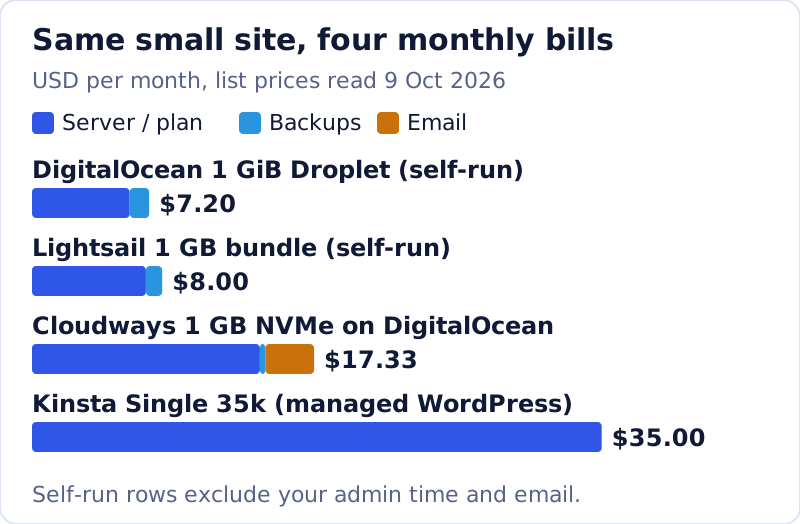
DigitalOcean, self-run: a 1 GiB Basic Droplet is $6.00 a month, and weekly backups are 20% of the Droplet price, so $1.20, for $7.20. Daily backups would be 30%, or $1.80. You install and patch WordPress yourself, and email is not part of the product.
AWS Lightsail, self-run: the 1 GB bundle with a public IPv4 address is $7.00 and includes 2 TB of transfer. Snapshots cost $0.05 per GB-month; if your stored snapshots total 20 GB, that adds $1.00, for $8.00. Lightsail's CDN starts at $2.50 a month for 50 GB if you want one.
Cloudways, managed: the 1 GB NVMe server card on Cloudways' DigitalOcean page reads $14 a month (the main pricing page headlines plans from $11). Offsite backup storage is $0.033 per GB, so 10 GB of backups adds $0.33, and Rackspace email is $1.50 per mailbox, so two mailboxes add $3.00, for $17.33. Server patching, the stack and support come with it.
Kinsta, managed WordPress: the Single 35k plan is $35 a month, or $30 a month billed annually, and covers one WordPress site, 35,000 visits, 10 GB of storage and 125 GB of CDN bandwidth, with daily backups kept for 14 days. Kinsta's plan grid also says this entry tier is not one it recommends for online stores or membership sites.
The spread between $7.20 and $35.00 is not waste. It is the price of who does the work. The self-run bills leave you as the system administrator; the managed ones charge for that job. If you are weighing those two routes, our managed cloud vs raw AWS comparison is the companion read, and you can try the managed middle option on Cloudways' 3-day free trial without a card.
Egress and add-ons: where cloud bills surprise
Outbound data transfer, or egress, is the line that turns a calm bill into a bad one, and the per-GB rates differ more than any other price in this article. Inbound traffic is free almost everywhere; you pay for what your site sends out once the plan's allowance is used.
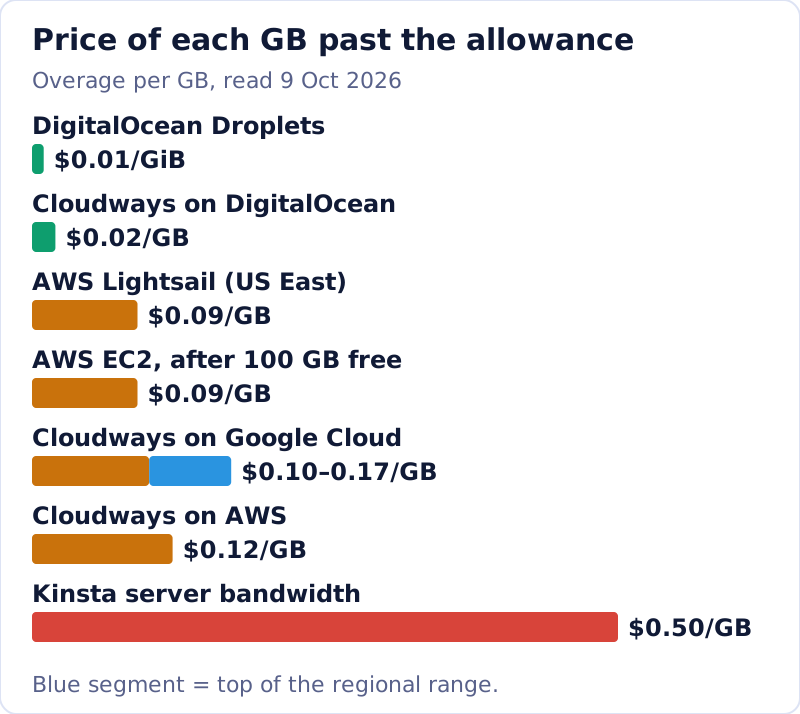
Read the chart as a risk map. A DigitalOcean Droplet that blows through its allowance by 500 GB costs an extra $5 at $0.01 per GiB, and DigitalOcean pools the allowance across all Droplets on the team. The same 500 GB on EC2 costs $45 at $0.09 per GB once AWS's 100 GB monthly free allowance is spent. On Cloudways, the provider you pick underneath sets the rate: $0.02 per GB on DigitalOcean against $0.12 on AWS. On a bandwidth-billed Kinsta plan, 500 GB over would be $250, which is why Kinsta emails you at 80% and 100% of the allowance.
The other add-ons are smaller but stack up. AWS now charges $0.005 an hour for every public IPv4 address, in use or idle, which is about $3.65 for a 730-hour month; Lightsail folds it into the bundle, which is why its IPv6-only bundles are cheaper ($3.50 against $5.00 at the smallest size). Cloudways sells email per mailbox. Kinsta lists an extra WordPress site at $30 a month, Redis at $100 a month per site and external backups at $2 per backup plus $1 per GB. None of these is hidden, but none appears in the headline price either.
A cloud price is a list of meters. The headline shows one of them; the invoice shows all of them.
How to cap a cloud bill
You cannot stop a usage-billed platform from billing usage, but you can make sure a spike announces itself before the invoice does. The habits below are the ones that matter, in the order we would set them up on a new account.
- Size the server for a normal week, not your best day, and let scaling or a manual resize handle the peaks.
- Turn on every billing alert the platform offers, at a level below what would hurt.
- Put a CDN in front of anything heavy, so images and downloads stop counting against server egress.
- Pick the provider by its overage rate if your traffic is spiky; it matters more than a $2 gap in the base price.
- Delete what you stopped using: idle IPv4 addresses, old snapshots and test servers all keep billing.
Check what happens at the limit as well. Kinsta charges overage at the end of the month but asks for immediate payment or an upgrade when an overage reaches the plan price or $500, whichever is less, and upgrades are not applied retroactively. A free tier can end differently: AWS's Free plan for accounts opened since 15 July 2025 closes after six months or when its up-to-$200 credit runs out, unless you upgrade.
On-demand, reserved, and commitment discounts
Every model above can be paid two ways: on demand at the list rate, or cheaper in exchange for a commitment. Kinsta's yearly billing is the plainest example: $30 a month billed annually instead of $35 month to month; Kinsta frames that saving as two months free. Hyperscalers go further with one- or three-year commitments on compute. The rule we would follow is to stay on demand until the bill has been boring for a few months, then commit only the baseline you are sure to use. A commitment made before you know your real load is how usage pricing turns back into lock-in.
Free tiers and trials: useful, with a catch
Free offers are a sensible way to test a platform, as long as you know where each one ends. DigitalOcean's App Platform hosts up to three static sites free, with 1 GiB of transfer per app. Google Cloud's always-free tier includes one e2-micro VM a month in three US regions, 30 GB-months of standard disk and 1 GB of outbound transfer from North America. Cloudways offers a 3-day trial with no card. AWS's Free plan gives new accounts up to $200 in credits over six months. Each one is generous enough to build on and small enough that a real site outgrows it, so price the paid tier you would move to before you launch on the free one.
Which pricing model fits your site
Pick by who will run the server and how spiky your traffic is. If you are comfortable on a Linux command line and traffic is steady, a DigitalOcean Droplet or a Lightsail bundle is the cheapest honest bill in this article. If you want the server managed but still billed like cloud, Cloudways sits in the middle, and choosing DigitalOcean underneath keeps its overage at $0.02 per GB. If you run WordPress and want the platform to own updates, backups and CDN, a managed tier like Kinsta costs more but is the most predictable. And if a cloud plan advertises a multi-year intro price, treat it as shared hosting with a renewal step. Our best cloud hosting ranking lays the hosts side by side.
Cloud hosting cost, answered
How much does cloud hosting cost per month?
What is a cloud billing model?
Why is cloud hosting pricing so hard to compare?
How much does Amazon cloud web hosting cost?
Is Google Cloud web hosting free?
Ready to choose a host? See the best managed cloud hosting, ranked, or start with what cloud hosting actually is.