AWS Website Hosting Cost (2026): Lightsail vs EC2 vs Managed
Hosting a website on AWS costs from $5 a month on Lightsail, about $17.50 a month for a small EC2 server once disk and an IP address are added, and more on EC2 as outbound traffic grows, at US East list prices read on 9 Oct 2026. Lightsail is the cheapest and most predictable way to run one site on Amazon; EC2 is the flexible option that bills every resource separately; and a managed host running on AWS sells the same infrastructure with the server administration done for you. The free tier no longer lasts a year for new accounts, which matters more than any price below.
This guide is for people who want an Amazon web hosting price they can budget, not an architecture diagram. If you already run Kubernetes on AWS, it will be too basic. If you have never configured a Linux server and do not want to, read the managed option first.
What a website on AWS costs, route by route
The answer depends on which AWS product you use, and Amazon sells three that a website owner will meet. The table prices the entry point of each one and names what is not included, because that is where AWS web hosting pricing stops looking like a hosting plan. Unless stated, prices are US East (N. Virginia or Ohio) list rates read on 9 Oct 2026, before tax.
| Route | Entry price | What's included | Billed on top |
|---|---|---|---|
| Lightsail bundle (public IPv4) | $5/mo (0.5 GB) · $7 (1 GB) · $12 (2 GB) | Server, SSD, IPv4, 1–3 TB transfer | Transfer past the allowance, from $0.09/GB |
| Lightsail bundle (IPv6 only) | $3.50/mo (512 MB) · $5 (1 GB) · $10 (2 GB) | Same, without a public IPv4 address | Same as above |
| EC2 t4g.micro / t4g.small | $0.0084/hr (≈$6.13/mo) · $0.0168/hr (≈$12.26/mo) | Compute only | Disk, IPv4 at $0.005/hr, data out past 100 GB at $0.09/GB |
| EC2 t3.micro / t3.small | $0.0104/hr (≈$7.59/mo) · $0.0208/hr (≈$15.18/mo) | Compute only (x86) | As above |
| Managed host on AWS (Cloudways) | Server price shown per provider | Server management, stack, support | Bandwidth past allowance at $0.12/GB |
Monthly figures for EC2 are our arithmetic at 730 hours. The t4g instances use AWS's Arm-based Graviton chips and are cheaper per hour than the x86 t3 family with the same memory; most WordPress and PHP stacks run on Arm without changes, but check any plugin or binary that ships its own compiled code.
Option 1: Lightsail bundles
Lightsail is AWS packaged like a VPS: one monthly price for a server with fixed memory, vCPUs, SSD and a transfer allowance. With a public IPv4 address, the bundles are $5 (0.5 GB memory, 20 GB SSD, 1 TB transfer), $7 (1 GB, 40 GB, 2 TB), $12 (2 GB, 60 GB, 3 TB), $24 (4 GB, 80 GB, 4 TB), $44 (8 GB, 160 GB, 5 TB) and $84 (16 GB, 320 GB, 6 TB). The IPv6-only versions of the same sizes cost $1.50 to $4 less, but a site without a public IPv4 address cannot be reached by visitors on IPv4-only networks unless something like a CDN sits in front.
Three details change the real price. Both inbound and outbound traffic count toward the allowance, though only outbound traffic past it is billed, from $0.09 per GB. Bundles in Mumbai, Sydney, Jakarta, Malaysia, Hong Kong and São Paulo get half the listed transfer. And the extras are priced separately: a CDN distribution is $2.50 a month for 50 GB, $10 for 200 GB or $35 for 500 GB; a load balancer is $18; block storage is $0.10 per GB-month; and snapshots, which is how Lightsail does backups, are $0.05 per GB-month.
One trap is in AWS's own WordPress example, which prices a 1 GB instance at $5 a month, plus a $2.50 CDN and a $1 storage bucket, for $8.50. That $5 figure matches the IPv6-only 1 GB bundle. With a public IPv4 address, the same 1 GB server is $7, so the example becomes $10.50.
Option 2: EC2, EBS and data transfer
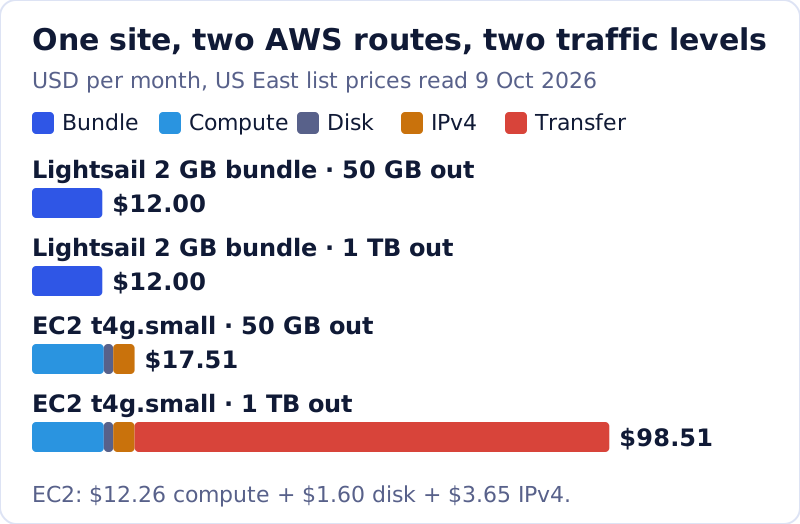
EC2 is the general-purpose AWS server, and it is billed as separate meters rather than a bundle. For a small site you pay for the instance by the hour, the EBS disk by the GB-month, the public IPv4 address by the hour, and outbound data by the GB. A t4g.small (2 vCPUs, 2 GiB) is $0.0168 an hour, about $12.26 a month. A 20 GB gp3 disk at the $0.08 per GB-month rate in AWS's pricing example adds $1.60. A public IPv4 address costs $0.005 an hour whether in use or idle, about $3.65 a month, a charge AWS introduced on 1 February 2024. That is $17.51 before any traffic.
Traffic is where EC2 parts company with Lightsail. AWS gives every account 100 GB of outbound transfer to the internet free each month, aggregated across all services and regions, and then charges $0.09 per GB for the first 10 TB in US East. At 1 TB out a month, that is 900 billable GB, or $81, which turns a $17.51 server into a $98.51 bill. The same traffic on the $12 Lightsail bundle costs nothing extra because 3 TB is included.
So why use EC2 at all? Because it is the door to the rest of AWS: auto scaling groups, load balancers that spread traffic across servers, managed databases and every instance size Amazon sells. AWS's EC2 service commitment is 99.99% monthly uptime at region level and 99.5% for a single instance, paid as service credits. If you need those building blocks, EC2 is the right tool. If you need one server for one website, it is the expensive way to buy what Lightsail sells as a bundle.
Option 3: managed AWS through Cloudways
The third route keeps the Amazon infrastructure and hands the server work to someone else. Cloudways, owned by DigitalOcean since 2022, lets you pick AWS as the provider under a managed server: it installs the stack, patches the operating system, runs backups and answers support tickets, and bills the server by the hour, with no monthly cap on AWS servers. On the AWS option, bandwidth past the server's allowance is $0.12 per GB, against $0.02 per GB if you choose DigitalOcean underneath instead.
We cannot quote the AWS server price here. Cloudways' AWS tab did not render prices in our US read on 9 Oct 2026, and its main pricing page headlines plans from $11 a month without tying that figure to a provider, so check the AWS tab before you buy. Cloudways offers a 3-day trial with no card, enough to see the real figure and the dashboard. Choose this route when your reason for AWS is the brand, the region list or a client requirement, and nobody on the team wants to be the system administrator.
Readers who just want managed cloud, not AWS specifically, should compare the whole field first: our best cloud hosting ranking covers it, and the managed-versus-raw trade-off is set out in managed cloud vs raw AWS. If AWS is the requirement, you can start a Cloudways trial on the AWS option and price it yourself.
Sponsored link to the host’s own site. If you sign up we may earn a commission at no extra cost to you — and it never changes where a host ranks or what we say about its pricing.
The free-tier cliff: six months, not twelve
AWS changed its Free Tier on 15 July 2025, and most guides still describe the old one. Accounts opened since then choose a Free plan or a Paid plan. The Free plan gives $100 in credits at sign-up and up to $100 more for completing set-up activities, so up to $200, with no charges unless you upgrade. It ends after six months or when the credits run out, whichever comes first, and then the account closes unless you move it to the Paid plan. Accounts opened before that date keep the legacy model of 12-month trials plus always-free services.
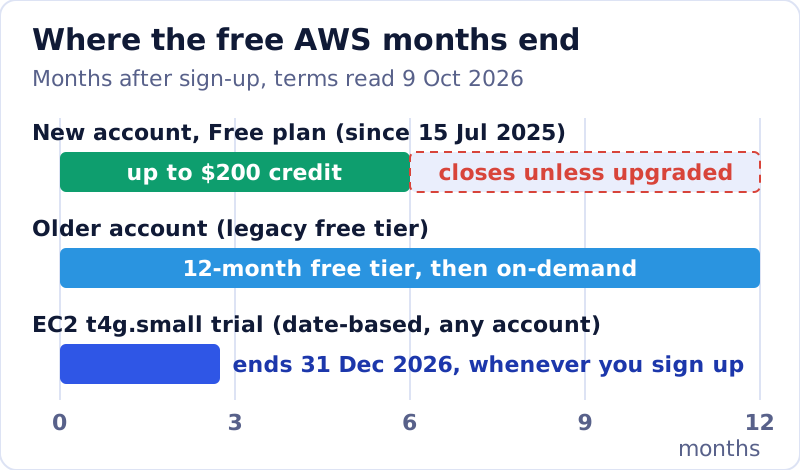
There is a separate, date-based offer worth knowing: AWS lets any account run t4g.small instances free for up to 750 hours a month until 31 December 2026, which covers one instance running all month. Disk, the IPv4 charge and outbound data past 100 GB are still billed. Plan for the cliff the way you would plan for a hosting renewal: write down the month the free period ends and the on-demand price that starts the day after.
On AWS the renewal cliff is a calendar date: the day the credits, the free plan or the trial runs out.
Hosting WordPress on AWS
Amazon web hosting for WordPress usually means Lightsail, and AWS's own Lightsail pricing example is a WordPress site. A 1 GB or 2 GB bundle runs a typical small WordPress install, with the CDN add-on for images if your visitors are spread out. What you take on is the administration: WordPress, PHP and operating-system updates, backups through snapshots, and security. If that list sounds like a part-time job, a managed host is the better buy even though the bill is higher. Our guide to cloud hosting for WordPress compares the managed options on that basis.
Which AWS option for which site
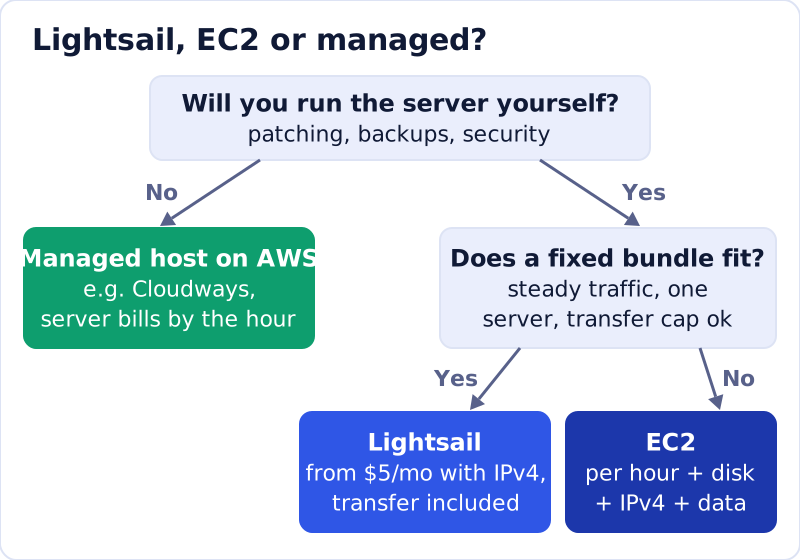
Pick Lightsail for a brochure site, blog or small store with steady traffic, where one server and a generous transfer allowance cover the year. Pick EC2 when you need what only EC2 offers: scaling across servers, other AWS services wired in, or an instance size Lightsail doesn't sell, and budget for transfer from the first GB past 100. Pick a managed host on AWS when the reason for AWS is a requirement rather than a preference and you'd rather pay for the administration than do it.
And if AWS is not a requirement at all, compare it with plain cloud servers before you commit: a 2 GiB DigitalOcean Basic Droplet is $12 a month with 2,000 GiB of transfer, and its overage is $0.01 per GiB. Our cloud hosting cost breakdown prices the same site across four platforms.
Edge cases that change the AWS bill
- Region: Lightsail bundles in six Asia-Pacific and South American regions include half the transfer, and EC2 rates vary by region.
- Idle addresses: a public IPv4 address you keep but don't use still costs $0.005 an hour.
- Snapshots that pile up: at $0.05 per GB-month on Lightsail they are cheap individually and easy to forget.
- The shared 100 GB: EC2's free outbound allowance is per account, so other services eat into it.
- Windows: Lightsail Windows bundles start at $9.50 a month with IPv4, nearly double the Linux price.
Taken alone, none of them is big. Together they explain most of the gap between the price on the AWS page and the first invoice, and each one takes a minute to check in the billing console.
AWS web hosting, answered
What does AWS website hosting cost per month?
Is AWS web hosting free?
Is Lightsail cheaper than EC2 for a website?
Can you host WordPress on AWS?
Does AWS charge for website bandwidth?
Ready to choose a host? See the best managed cloud hosting, ranked, or start with what cloud hosting actually is.